The TOWER VISIT RECORDER for Windows
The Main Features
- Worldwide tower data
- Keep a log of your first Visits, Quarters and Peals
- Your UK tower visits are shown as red dots on UK Density Map
- Visits outside the UK are recorded but not mapped.
- A no frills but easy to use. A low budget program - its FREE
- Each family member may have their own log
- A map shows the location selected
- Logs may be printed or viewed on screen
- Runs on all Windows versions released after 1995 to present day [Win95, 98, 2000, XP, Vista,
Windows 7 -> 10]. Users with 64 bit machines, if experiencing difficulty opening the program should right click instead of left clicking 'Visit Logger' on the start button menu and select the compatibility wizard.
- Sorry, but I can offer no equivalent program for iPad, Mac or Linux users.
AS FROM APRIL 2022 THIS SOFTWARE IS NO LONGER RECOMMENED - SO I WOULD DISCOURAGE YOU FROM DOWNLOADING IT. EXISTING USERS MIGRATING TO A NEW COMPUTER MAY WISH TO EMAIL THE AUTHOR, via the Home Page tab.
Reason for Withdrawal
I am only discontinuing allowing new users to avoid them starting to use software whose life expectancy is unknown. The CCCBR Dove team are replacing the data source used by the logger, so it may not be possible to provide the annual Dove updates as in previous years. For current users, I hope to provide some means to transition people from my Tower Visit Recorder to a new App that Dove are promising. If not, then to a format suitable for use with a spreadsheet or word processor.
Since the demise of my Windows 98 computer, I only have an old 2010 Laptop capable of running the compiler software needed to create new versions of the Tower Visit Logger and the debugging tools no longer work with its MS Vista. Microsoft's security precautions now make it very difficult or almost impossible to download 'unsigned' software. This is understandable as there are so much malicious software out there. To obtain the security certificate to allow me to sign software would cost around £100 per year. In the past I have spent £250 on proffesional compiler software which rapidly gets outdated. This expense is something I can't afford when I'm giving the Tower Visit Recorder away for free. I have regrettably had to take the decision to pull the links for new users, to prevent them starting using software whose life cannot be guaranteed.
Until the Dove App. becomes available, it may be advisable for new ringers to record their grabs using a spreadsheet, as it is usually possible to export the data in various formats and hopefully one that is accepted by Dove App.
I am sorry for the disappointment, but its these outside influences that caused me to make the difficult decision to withdraw Tower Visit Logger when it works perfectly well.
How To Use the Program.
The Main Screen
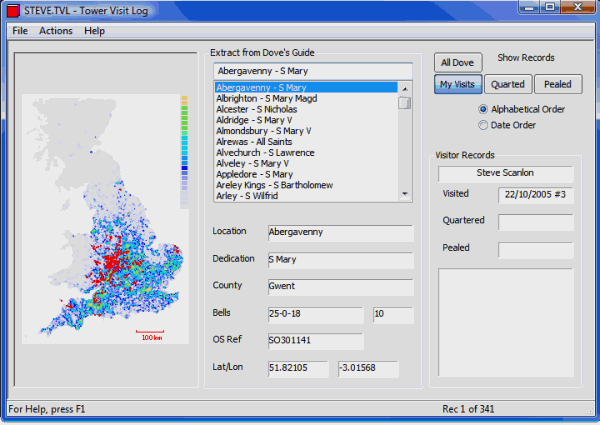
After installing the Tower Visit Logger, the program will appear on the start menu under 'Bell Ringing' as 'Visit Logger'. The next stage is to set up Visit Logs for each user. All this requires is a few clicks of the mouse. Accessed from the Menu: Actions / Manage Users
To record a visit, the user first opens their log with Menu: File / Open. Using the Dove Extract window, scroll to the tower and clicks on the appropriate field in the Visitor Records box. The full date and sequence number may be recorded if known, but when transferring historic records from diaries etc, partial dates or simply a flag to indicate a visit may be recorded. The Logfile is gradually built up over any number of sessions.
As each tower is selected, its location is shown on the map (UK Mainland only) as a Red dot. When switching over from displaying All Dove, to your own Visit - Quarters - Peal records, the map displays Red dots for each tower in the selection. My 341 towers are shown on the map above.
Visit logs may be viewed from the main screen, or printed on paper if desired. There are Seven different display and print modes. Print preview enables the printed layout to be checked before committing to paper.
Updating the Doves Tower Information
Tower Visit Logger contains an extract from the 'Central Council of Church Bellringers' Dove database, containing all the rings hung for change ringing having more than three bells. If you ring somewhere that isn't yet in my database, it can be added manually.
To check if a new database version is available use the Visit Logger's main Menu: Actions / Check for Database Update. The tower database was updated annually but few people bothered, so please read the comments in the screen that opens.
Using and Uninstalling the program.
Once installed, the program appears on Window's Start Button Menu, under Programs / Bell Ringing. Should you tire of it, use Control Panel 'Programs and Features' formerly known as 'Add or Remove Programs' to uninstall and remove all trace of the program from you hard disk.
Existing User Upgrading Computer
If you are an existing user upgrading to a new computer and moving your Log over then please click on this link to the Upgrade Page for details on what to do.
Any New Users should very carefully consider whether its wise to download this short lived program. If you are really happy to download against my recommendation, click the link below to go to the download page.
Instructions for Downloading and the Software Itself